
![Glaze & My New [Little] VFX Hub](/_astro/glaze-cover.CVO7v1Q3_1J60vp.webp)
As a fan of Raycast, I heard about Glaze a little while back, and was intrigued: An AI prompting tool that spits out Mac desktop apps and makes them shareable. They’ve finally released it to the public, and I decided to take it for a spin. As with many AI tools, I tend to wait until I have some specific thing I’d like to try to build, and I’ve had one in the back of my mind for awhile. This would just be a little tiny version of it, albeit something that will actually make my day-to-day a little easier.
Quick Backstory
Years ago, when I was working on automating various aspects of my home VFX pipeline, which I blogged about here and here, I really caught a bug for this sort of thing and got a bit lost down the rabbit hole (and definitely failed to do much in terms of sharing these ventures). In one corner, I went through Ben McEwan’s (an old friend from my TFN days) Python for Nuke 101 course, and built out some automated write nodes in Nuke. In another corner, I enrolled in a Technical Director course by Allan McKay (Look, I learn great from Australians, okay?).
While I got too busy actually working as a compositor and never managed to get through the TD course, I did get as far as designing a hierarchy for how I envisioned my personal pipeline to work. I was already into naming conventions as far back as high school, so I ran with those, along with a little refinement. What I dug about this setup was that I got to inject my own opinions on how things should be organized, informed by my smattering of experiences across studios.
Long story short, while I had some scripts at one point that would automate the creation of VFX projects and subsequent shots and their subdirectories, lately I’ve been just copy/pasting folder templates as needed and thinking every time “I’ll write some nicer tools to do this for me one of these days.”
My personal directory tree inside a shot:
├── _Plates
│   ├── Denoised
│   └── Original
├── Comp
│   ├── _Renders
│   ├── AE
│   └── Nuke
├── FX
│   ├── _Renders
│   ├── Blender
│   ├── Houdini
│   ├── Max
│   └── Other
├── Lighting
│   ├── _Renders
│   ├── Blender
│   ├── Max
│   └── Maya
├── Paint
│   ├── _Renders
│   ├── Nuke
│   └── Sil
├── Precomps
│   ├── _Renders
│   ├── AE
│   └── Nuke
├── Roto
│   ├── _Renders
│   ├── Mocha
│   └── Sil
└── Tracking
    ├── _Cams
    ├── Blender
    └── Syntheyes
If you’re really curious, here’s the full diagram I designed back in 2022. Ignore the references to AvN3. It was purely a hypothetical stand-in project.
So What’s Glaze?
Glaze is an app developed by the Raycast team that allows you to develop Mac desktop apps with nothing but AI prompts. It appears to be creating them as Electron apps and not fully native Swift apps, but that’s neither here nor there for the users they seem to be aiming this at. I certainly don’t care for my use case, despite my personal preference for full-on Mac-Assed Mac apps (I develop my website in Nova).
Anywho… Armed with a rather detailed intention and a number of projects already using this structure, I thought Glaze might be able to help me whip up something simple to at least navigate things a little easier, and get a quick overview of it all. One thing my pipeline is not designed for is folder diving. It’s intended to be walked and accessed by automated tools. So why not throw Glaze at this and see if it can pull off a simple tool just for me?
Building a VFX Hub
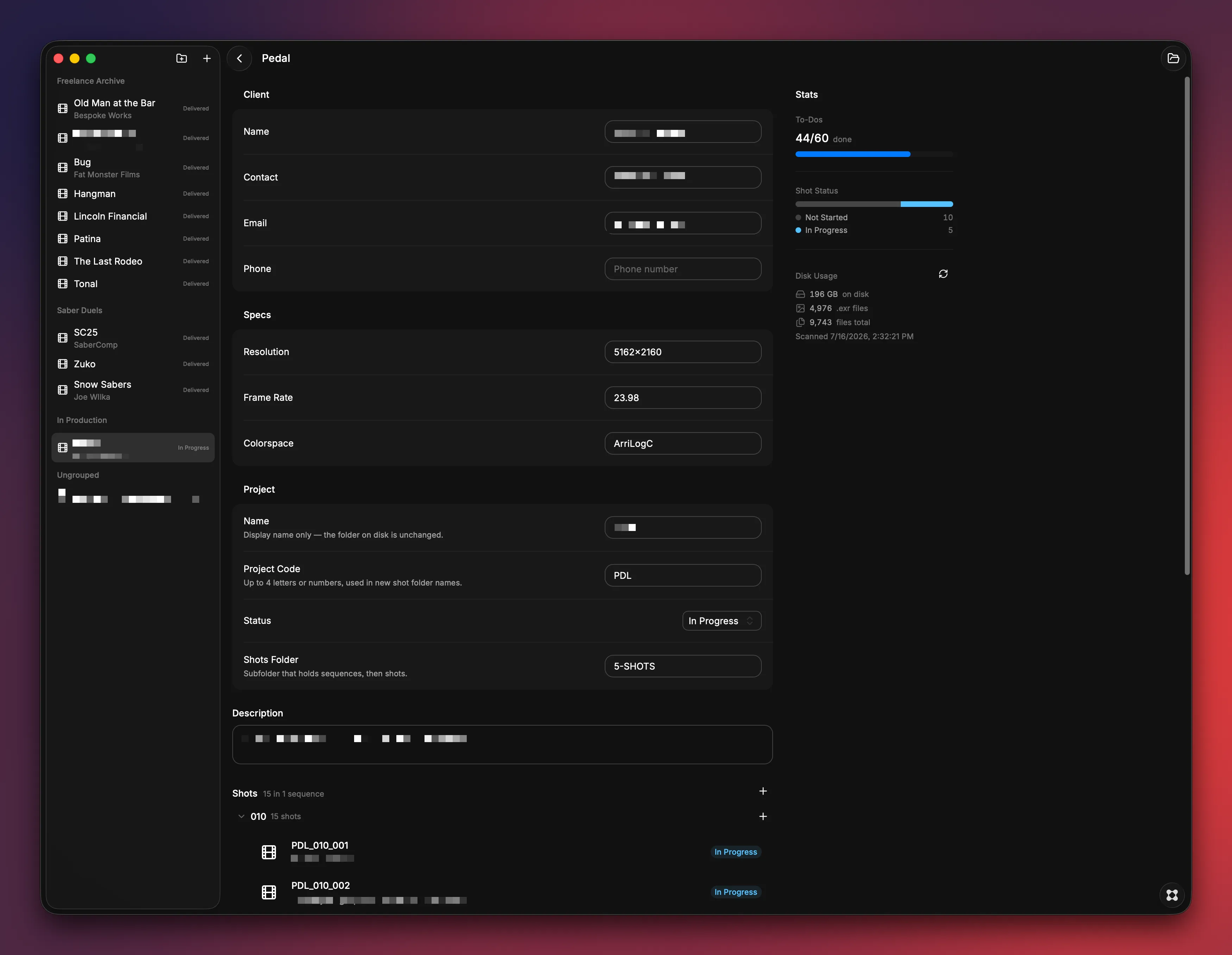
In a relatively short span of time, Glaze had something up and running that was surprisingly useful. It asked a few preliminary questions, such as how metadata should be stored (JSON sidecars), what sort of hierarchy I had, naming conventions, etc. I was able to feed it directory trees like above, and later gave it the full PDF diagram once I found it. It asked if I wanted it to try to do the whole thing in one go, or do it in phases. Phases seemed the more responsible route, so its first pass basically just fetched projects, found the shots directory, and listed the shots. From start to this point was like 30 minutes.
Next came the fun part: making adjustments, finding where I ran up against a wall, and having it make changes. I had to explain to it that not everything in my Freelance folder used this structure, so we shouldn’t just pull everything in. Let me import only the projects I want. Then let me organize stuff into folders within the app, but don’t move them on-disk. Oh, and turns out my personal projects use this pipeline, but always within a VFX folder, since I also have Editorial directories. So I need to be able to rename imported projects so I don’t end up with a bunch called “VFX”. Again, don’t change the name of the folder on-disk.
I also wanted this to allow me to start a new project. Give it a name and a project code for shot naming, and it will create the directory and all subdirectories ready to go. But for some reason when it first wired it up, the button wasn’t rendering. It took it 32 minutes to get to the bottom of that one.
Glaze, after finally cracking it:
Worked for 32m 27s
Found it — the real bug wasn’t the menu type at all. It was the sidebar/toolbar auto-styling logic silently breaking any dropdown menu’s button whenever it passed through the “actions” shortcut, with no error thrown anywhere.
Fixed all four spots — sidebar top button, both group headers (“Freelance” and “Saber Duels”), and the dashboard toolbar — by building those toolbars manually instead of using that shortcut. Verified all six buttons now render correctly, and type-check/lint are clean.
Shot Statuses and Notes
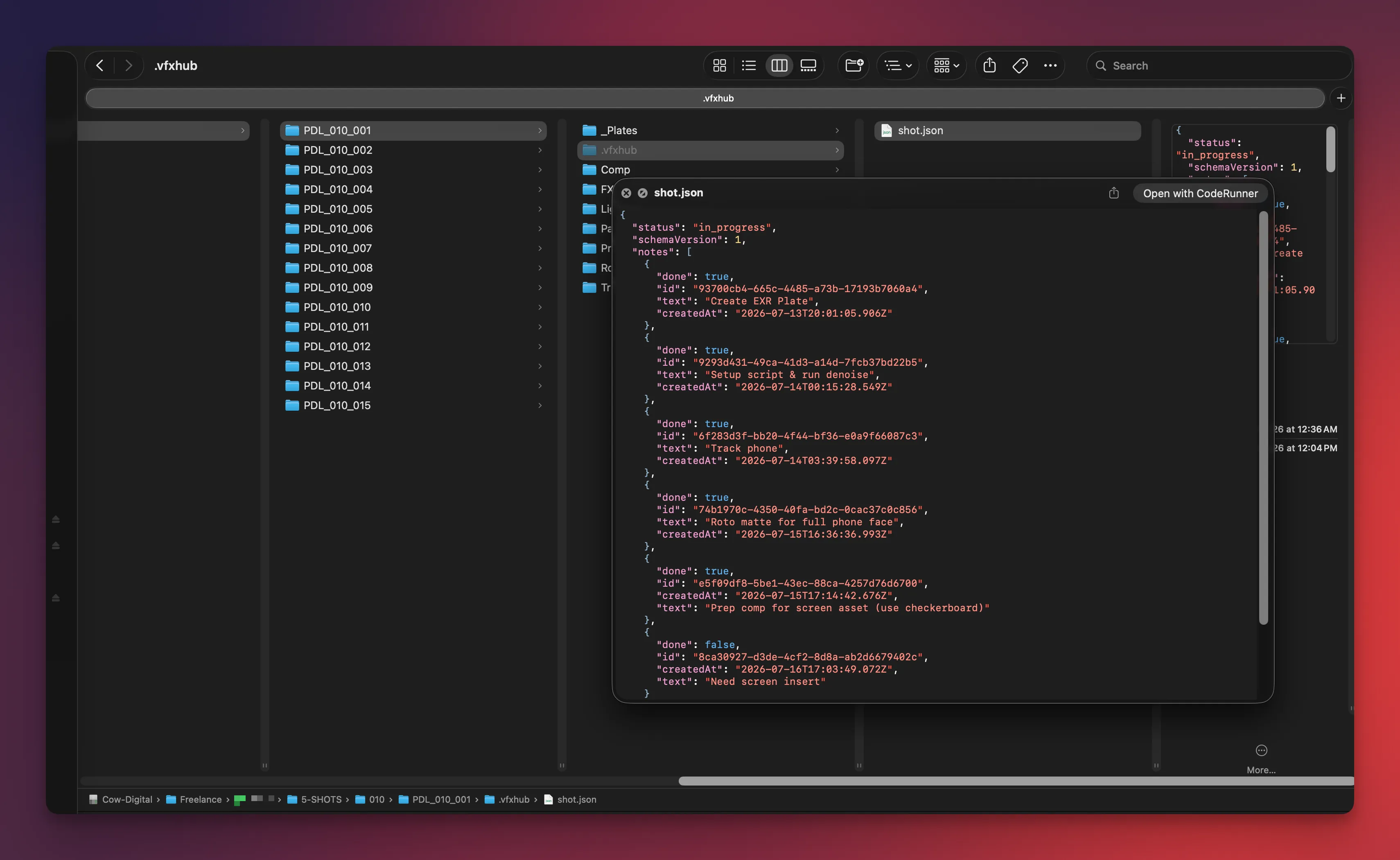
While we were in here, I thought it’d be fun to be able to throw some information into a shot view that would be useful, such as a description of the scope of work. Then I thought, why not to-do items that I could check off? So it did that. What’s even better, it stores all this information in a JSON file under a hidden directory alongside everything in that shot. So if I build a more complicated system in the future, I can point it at these files and use the information that’s in there. On top of all that, I just love having the actual to-do items and history of work done on the shots stored right there in the project itself and not some spreadsheet somewhere else.
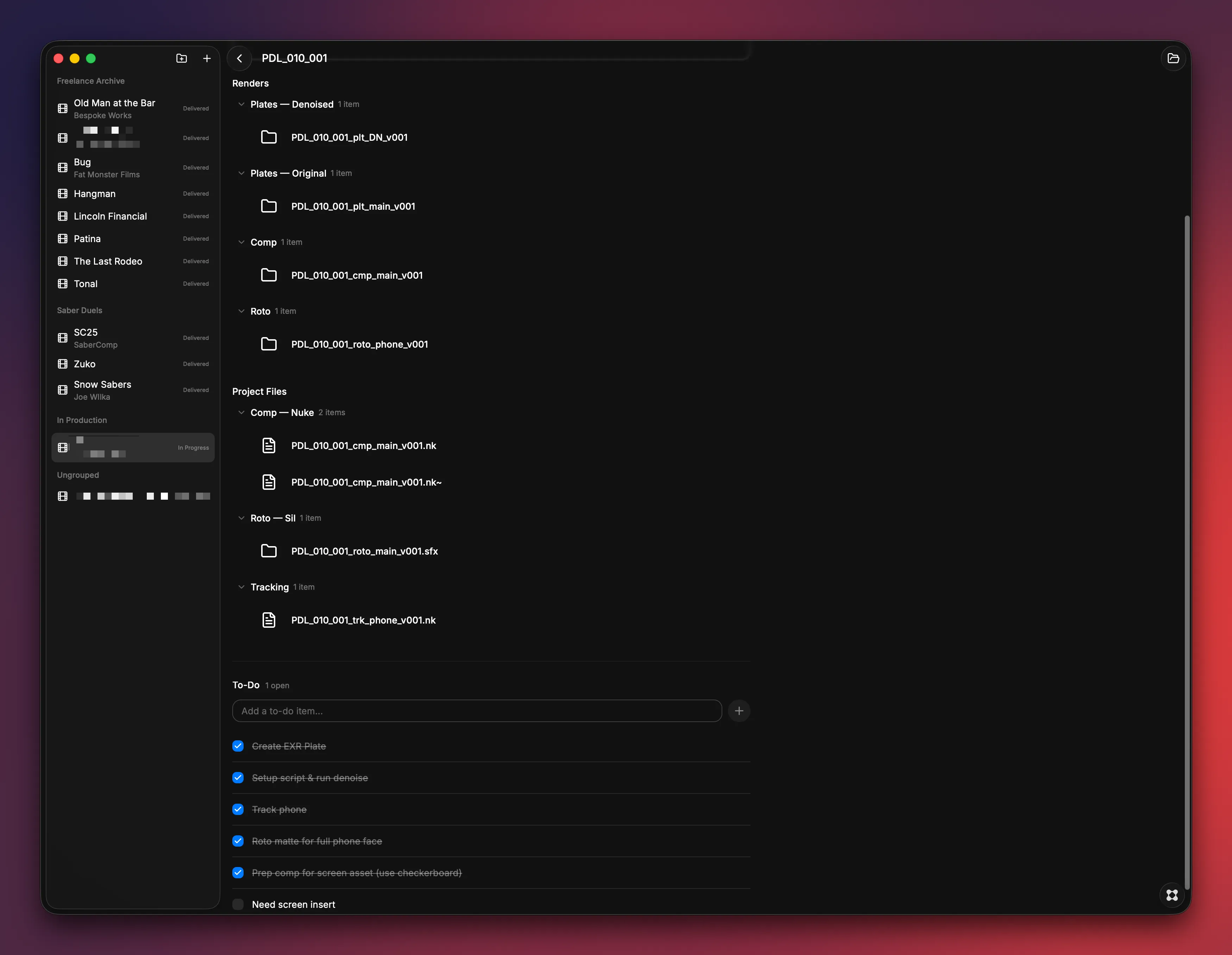
Another random idea I thought of was having it scan any _Renders folder and display whatever it found. So now I can see how many comps, precomps, plates, roto, etc. exist for a shot, in one easy-to-access view. Click on any one of them, and it opens the directory in the Finder. The window was feeling a little sparse, so I had it display various statistics. How many to-do items are open/done? How many shots are sitting in what status? Color coding status indicators, disk usage. Each one was just a prompt, sometimes with a little back-and-forth for clarity or decisions I needed to make.
Taking it Further
Now that I have JSON files attached to everything, I realized I could leverage the power of having the scope of work tied into the directory itself. So when I popped over to my PC to set up some base comp scripts and run out denoised plates, I thought… “I bet Claude could handle this.” So after setting up one script and creating the batch render output (another little script I built for myself years ago), I pointed Claude Code at the VFX directory and asked it to look at that first shot, and create subsequent scripts for the other shots in the project. Swap out the read nodes, set the frame range, set the correct output, etc. For those who don’t know, a Nuke script is a text file you can read and edit. So it worked flawlessly, and within about 30 minutes I had the whole project outputting denoise precomps… something that would’ve taken me maybe an hour or two to mindlessly set up.
Oh! I should mention this other important detail. I didn’t just have Claude do the stuff outright. I tasked it with creating a Python script that does this. And to ensure I could reuse it on any future project. So that’ll be included as part of the project creation that my VFX Hub app does from now on. Claude is basically my own personal TD now. The real kicker was when I was wondering where it had put this script… and discovered to my delight that Claude located and decided to place it under my already-created DEV/Scripts directory that’s part of every project.
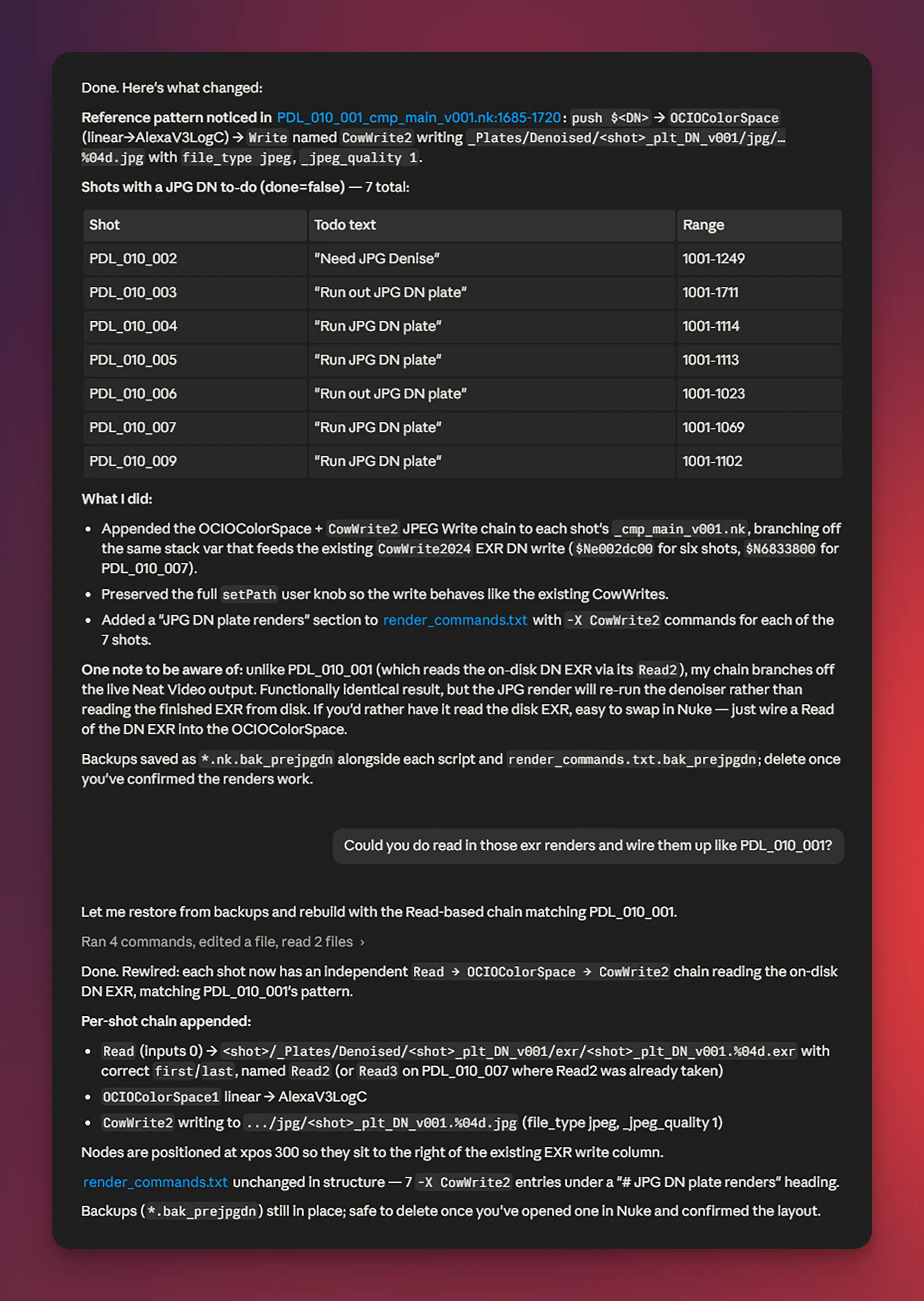
The last little cherry on top was when I needed to run out jpeg sequences of these denoise plates for only certain shots (I roto on jpeg plates so I can cache more frames in Silhouette). So I had a “run out jpeg plate” to-do item on the necessary shots. I was able to ask Claude to quickly create jpeg write nodes for only the shots that had the corresponding task. Again, it just did it so much faster than I would have. Even with my fancy new setup, I’d have to click through each shot in VFX Hub, check if it had that to-do item, then open the script and do so. Claude can look at the whole picture and just do it all in one go.
Fun Stuff
So. Is this a super robust pipeline tool the likes of which could carry a team? Dear God it’s not even close. Is this a slick little thing that makes my day-to-day life easier when doing little projects on my own? Holy crap yes. This is all stuff I think I could have done myself… eventually. And I likely still want to try to build out more of it myself.
In the meantime, instead of banging my head against my desk trying to figure out how to write some little piece of Python, I can get a tool up and running to solve the problem and get on with my day. And working with these systems to build some of this stuff out is honestly just as delightful as figuring out how to string some variables together for the first time.
When and if I do go down the road of building a more robust personal pipeline, I can’t imagine doing so without the likes of Claude Code. Maybe Glaze can also help make a little Mac-friendly front end. Again, more for just me. And that’s the really cool aspect of what AI is doing to small-time software development in my humble little opinion. Tailor-made tools that address exactly what you need… that’s going to be crazy.

![The Great Cow Frame Mover [9000]](/_astro/featured_image-2.CsI6PIRA_Z1hhD3I.webp)